
A Seedance infinite zoom prompt needs more than a list of beautiful places. Each place needs a visible detail that already contains the next place, and the camera needs a continuous route into it. A Droste-style sequence adds recursion: the final world contains the opening world again. That describes the intended visual structure; it does not guarantee a seamless video loop.
On October 20, 2026, aimikoda shared a Seedance 2.5 Droste-effect example and a detailed public prompt. The prompt gives a useful starting point for understanding nested transitions. This article explains that design and provides a smaller original planning example. Seeora has not reproduced the creator's generation; the examples below are untested prompt suggestions.
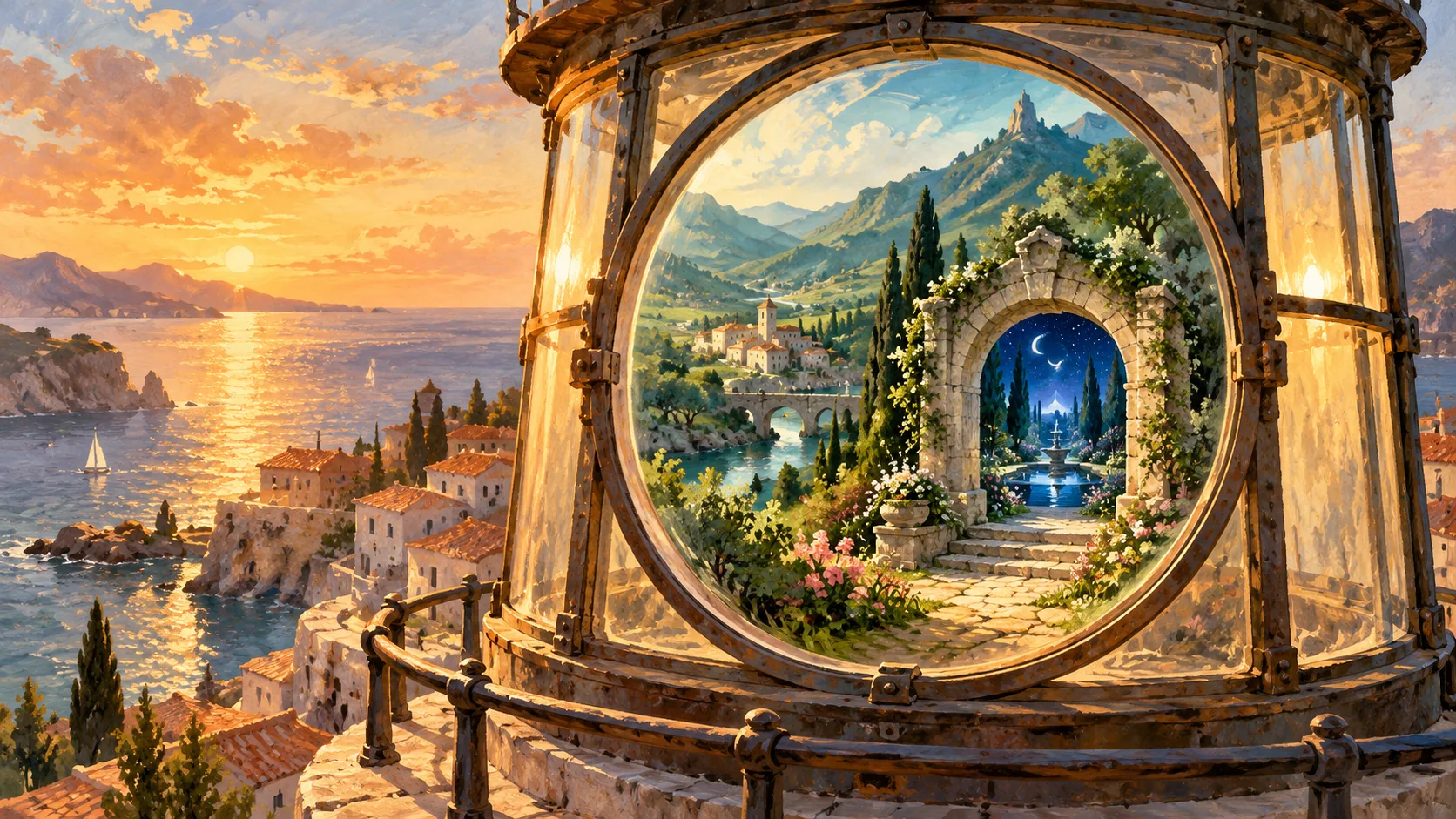
AI-generated concept illustration made with Codex imagegen; not a Seedance output or software screenshot.
What the published prompt actually asks for
The creator describes ten hand-painted worlds in one continuous shot lasting about 30 seconds. Each world contains a small detail with the next world painted inside it. The camera approaches that detail until its edges leave the frame and the miniature becomes the new full-sized scene. The tenth world's detail contains the first world.
The instructions also specify an unchanged forward rhythm, three seconds per world, gently curved approaches to details in different screen positions, and background activity continuing during the move. They exclude cuts, fades, speed ramps, still frames, dialogue, and readable text. Audio is described as a continuous piano-and-strings score with local ambient sounds.
These are requests in a creator's prompt. They are not official guarantees about exact timing, supported clip length, native resolution, or loop accuracy. Check the duration and reference controls exposed by your selected provider before adapting the idea. A prompt mentioning 30 seconds does not create a duration option that the interface lacks.
Choose the detail before writing the next world
The transition target has two jobs: it must be easy to locate in the current image, and it must make sense as the boundary of the next image. A lantern window, framed painting, or round ornament gives the viewer a shape to follow. A vague instruction such as “enter another universe” leaves that boundary unspecified.
Plan the relationship as a short chain:
| Current world | Visible target | World inside the target |
|---|---|---|
| Coastal village | Round lighthouse window | Green valley |
| Green valley | Stone garden arch | Blue night garden |
| Night garden | Small illuminated round window | Opening coastal composition |
This table is an original design exercise, not a reconstruction of every scene in the source. Start with fewer worlds so you can diagnose the transitions separately. If the valley appears through a dissolve before the camera reaches the window, the nesting instruction has failed even if both scenes look attractive.
A smaller original infinite zoom prompt
Use the following as a shot brief, then select a supported duration in your generation interface. It deliberately leaves out exact per-world seconds until you know the available total length.
One continuous forward-moving shot through three original hand-painted worlds. Begin above a warm coastal village, with a round lighthouse window clearly visible ahead. A complete miniature green valley is already visible inside that window. Glide toward it at a steady perceived pace. Keep the window boundary visible until it passes beyond the image edges; the valley then fills the frame. In the valley, approach a stone garden arch containing a miniature blue night garden. Continue forward through the arch without a cut or dissolve. In the night garden, approach an illuminated round window containing the original coastal village composition. End with that opening composition filling the frame. Maintain a coherent forward direction and gently guide each target toward the center. Keep small environmental movements continuous. No cuts, fades, sudden acceleration, readable text, or frozen holds. Use one continuous ambient sound bed without dialogue. Treat the return to the opening as a loop target to inspect, not a guaranteed seamless result.For other shot structures, the Seedance prompt library can help separate subject, action, environment, and camera movement. Keep those categories clear here: the world supplies the environment, the nested detail supplies the destination, and the forward move supplies the camera instruction.
Review movement and transitions separately
First watch at normal speed with sound off. Can you predict where the camera will go before the transition happens? Does each miniature exist before the approach begins? Does the target expand continuously, or does the image replace itself halfway through?
Then scrub around each boundary. Look for doubled frames, a disappearing window rim, a sudden sideways jump, or a change from forward travel to a stationary dissolve. These observations are more useful revision notes than “make it smoother.” If the approach is confusing, try moving the target nearer the center or simplifying its surroundings before adding another world.
Steady perceived movement also needs visual review. Repeating “constant speed” cannot establish that the rendered result obeys it. A long hold followed by a fast plunge is a pacing failure even when the sequence reaches all destinations. Compare the time spent finding the target with the time spent entering it, then revise one part of the brief at a time.
Check the loop as a separate delivery step
A recursive ending and a seamless export are different requirements. Compare the final and opening frames for framing, scale, light, and object placement. Play the exported clip repeatedly and listen for a restart in the sound bed. Returning to a similar village with a different window position can still produce a visible jump.
If the seam fails, keep the useful continuous sequence and label it as an infinite-zoom concept rather than claiming a seamless loop. You can also plan a separate editing pass, but trimming or crossfading changes the delivery method and should be documented. Preserve the original generation alongside the edited export.
This effect differs from a portal composite, where a mask reveals a second version of footage inside an opening. Here the central task is following a nested camera path through successive worlds. Begin with one readable entry, inspect its movement and boundary, and expand the sequence only after that transition works for your intended use.