
If the character looks right but stands in the wrong place, adding more appearance adjectives may not solve the problem. A 3D previs reference addresses a different question: where subjects and objects belong, when they move, and how the camera sees them. Character images can then describe what those subjects should look like.
Recent Seedance 2.5 creator demonstrations make this separation worth understanding. This article explains the evidence and proposes a small experiment with clear review criteria. Seeora has not reproduced these workflows; the example below is an original planning template, not a tested recipe or a promise of fewer generations.
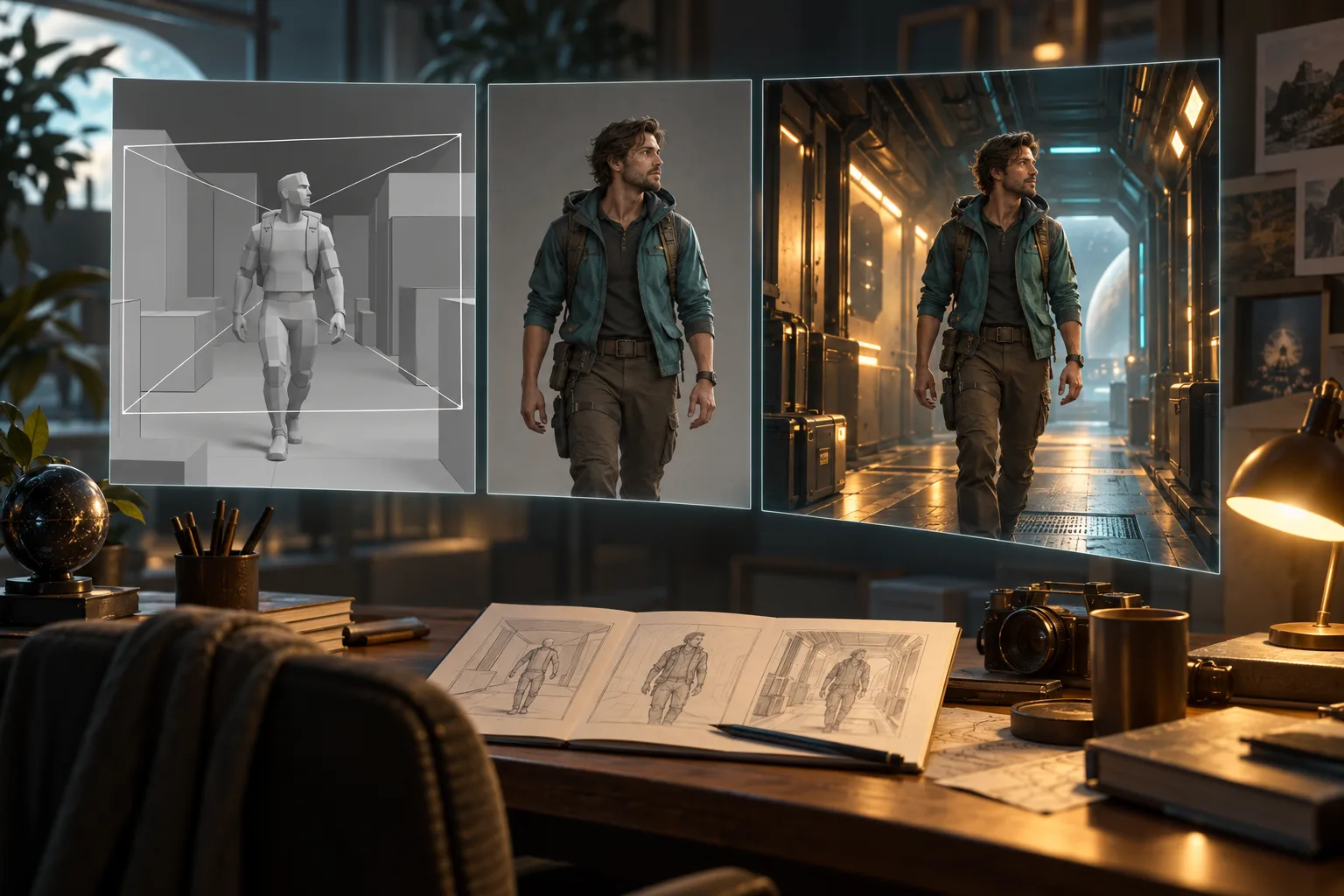
AI-generated concept illustration made with Codex imagegen. These panels are not application screenshots or Seedance outputs.
What the sources establish
The official Seedance 2.5 model page describes white-model control, camera movement, performance blocking, and reference-video understanding. This establishes that spatial references are part of the model's advertised production capabilities. It does not establish that every provider exposes the same controls, or that a reference becomes a deterministic camera track.
On October 6, 2026, eijo_AIart described making a moving draft with mannequins and boxes before generating through Higgsfield. Their follow-up assigned movement, timing, and camera direction to the previs video, and face and clothing to character images. They also specified that the mannequin's appearance should not carry over. The creator reported getting the intended cuts in one generation; that is one person's result, not a measured success rate.
Earlier, xingor_dev on September 29 described an AI-assisted Blender plugin for building low-poly previs, adjusting subjects and camera movement, then using the result as a Seedance 2.5 reference. This is older context, rather than a new release. Together, the sources illustrate a useful division of responsibilities without proving universal fidelity or cost savings.
Previs, storyboards, and depth videos serve different jobs
A storyboard records selected compositions and the intended sequence. A moving previs adds timing: how long an approach takes, when a camera changes direction, or when an object leaves the frame. Simple geometry can make these decisions visible before final textures and character design distract from them.
A depth reference usually starts from an existing recording and represents its changing spatial structure. A 3D previs starts from an authored scene, so you can choose object placement and camera motion before generating any finished footage. Read the depth-video reference explanation if you already have a recorded performance to transfer.
Neither representation guarantees exact motion. Seedance's official description emphasizes creative interpretation of references. Review the generated shot as a new interpretation of the plan, rather than assuming it contains Blender's underlying geometry or camera data.
Plan one shot before a full sequence
Begin with a simple task: an adult explorer crosses a corridor, stops beside a crate, and looks toward a doorway. Use one character, one important prop, and one slow camera move. Complexity should increase only after the first result preserves the spatial relationship you care about.
Create the previs in Blender or another tool you already know. A mannequin can represent the explorer; boxes can represent the crate and walls. Make the important action understandable in this plain version. If the crate blocks the doorway or the subject disappears behind a wall, correct that arrangement before asking a video model to interpret it.
Review the beginning, midpoint, and ending. Check that the frame has room for the subject, that the stop is readable, and that the camera movement does not accidentally hide the prop. Export a reference clip in a format and duration supported by your chosen provider. Confirm that its interface actually accepts both video references and character images; ordinary image-to-video mode should not be assumed to offer the same input arrangement.
Assign an explicit role to every input
Use the provider's actual reference labels or mentions when writing the prompt. “Video1” and “Image1” below are placeholders, not universal interface syntax.
| Input | Intended responsibility | What to review |
|---|---|---|
| Previs video | Placement, action timing, broad framing, camera direction | Did the stop and doorway relationship survive? |
| Character image | Face, hairstyle, clothing, recognizable identity | Did the gray mannequin become the intended character? |
| Written scene description | Final environment, materials, lighting, sound | Did styling change the spatial plan? |
Avoid assigning incompatible jobs. If the reference camera stays behind the character, a prompt demanding a continuous frontal close-up asks the model to reconcile two different plans. Decide which requirement matters, then revise the previs or the text accordingly.
Here is an original example to adapt after checking your provider's inputs:
Use Video1 to guide the explorer's movement, stopping time, broad composition, and slow forward camera movement. Use Image1 for the adult explorer's face, hair, and teal jacket. Replace the gray mannequin and plain boxes with the described character and a realistic station corridor. Keep the crate beside the doorway and preserve the explorer's path. The explorer walks toward the crate, stops, then turns toward the open doorway. One continuous shot. Warm overhead light, quiet footsteps, no dialogue or on-screen text.Compare against the plan, then change one thing
Review placement, timing, camera direction, identity, and unwanted reference appearance separately. A visually attractive clip can still fail if the doorway moves to the wrong side. A faithful composition can still be unusable if the mannequin's surface survives or the character's clothing changes.
If placement fails, simplify or clarify the previs. If identity fails, inspect the character reference and its assigned role. If camera direction conflicts, remove competing instructions. Keep the same inputs while changing one requirement, and record the actual provider, settings, and result. This makes the next attempt informative even when it needs another generation.
Once one shot works, plan adjacent shots with consistent prop locations, character details, and screen direction. The immediate goal is a readable spatial plan and a reviewable output. Any claim about saved credits, fewer retries, or exact camera reproduction should come from your own recorded comparison, not from a creator's single successful example.
For broader wording and shot-direction examples, use the Seedance prompt guide.