
A depth-video reference offers a way to describe an existing performance through its changing spatial structure, while supplying a separate image for the new character's appearance. Recent Seedance 2.5 demonstrations show why creators are interested: they want recognizable choreography without simply carrying the original performer's clothes and scene into the new clip.
This article explains the public evidence and a small experiment to plan. Seeora has not tested this workflow, and the examples do not establish exact motion tracking or a dedicated depth-control feature across every Seedance provider.
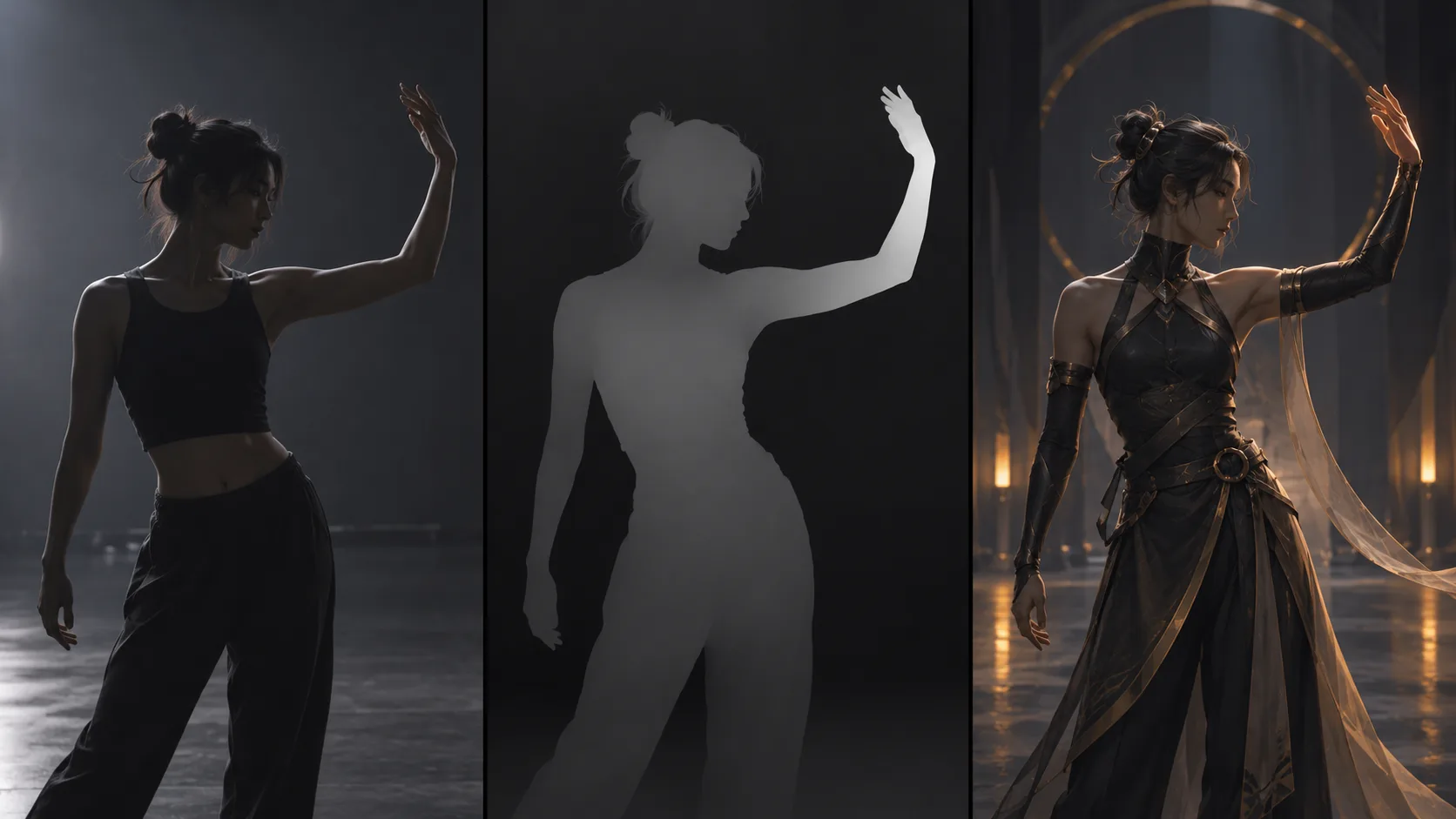
AI-generated concept illustration made with Codex imagegen. These panels are not screenshots, measured comparisons, or Seedance outputs.
What the demonstrations actually show
On October 5, 2026, ZetoGroovin described recording a roughly seven-second hand wave, converting the recording to a depth-map video, and combining that video with a character sheet in Seedance 2.5 Omni Reference. The creator assigned body movement to the video and appearance to the image, using a fixed camera. They reported that the arm motion carried over while the character sheet governed the new face, hair, and clothes. This is a creator's assessment, not an independent measurement; the post does not name the depth converter.
A separate October 5 WaveSpeedAI demonstration presents Depth Anything V3 followed by Seedance 2.5 as a way to restage choreography with different characters and surroundings. It is a service-provider demonstration, rather than a new Seedance model announcement. It supports investigating this combination but does not prove that the first creator used WaveSpeed's converter.
Depth video, character image, and prompt have different jobs
The Depth Anything 3 project concerns estimating scene geometry from visual inputs. A depth representation describes spatial relationships; it is not itself a finished performance by the replacement character.
For its hosted converter, WaveSpeed's video documentation specifies clip-wide depth normalization, a default grayscale visualization, and relative rather than metric depth. Near surfaces appear brighter and distant surfaces darker. The documentation says output preserves duration, resolution, and source audio, with frame rate capped at 30 fps. Those are converter properties, not Seedance generation guarantees.
Think of three separate assignments: the reference video supplies the intended movement, the character image supplies visual identity, and the prompt describes their relationship plus the new setting. A short text instruction can clarify those roles, but it cannot create an upload capability that the selected interface lacks.
Plan one movement before a whole dance
Start with a provider interface that explicitly accepts both reference video and reference images. Confirm its accepted formats, duration, and reference labeling before paying for an attempt. If only a starting image is available, this particular experiment needs a different entry point. Seeora's available generation controls should be checked directly; this article does not announce a depth converter or a new motion-transfer tool on this website.
Record a short, simple movement against an uncluttered background. A hand wave with the torso visible makes a more understandable first target than a spinning group routine. Keep the moving limb inside the frame and choose a fixed viewpoint. These are practical experiment choices, not conditions proven necessary by the demonstrations.
Inspect the converted clip before generation. Scrub through the beginning, middle, and end. If the hand merges into the torso or the foreground changes brightness abruptly, the intended structure may already be ambiguous. Correct the input or conversion before spending another generation attempt. Use grayscale when following the documented WaveSpeed depth-workflow recommendation; do not assume a colorful preview is an equivalent conditioning format.
Choose a character image whose pose and proportions permit the movement. Keep outfit details readable and avoid adding several identities to the first attempt. Save the original recording, depth result, character reference, and provider settings together so later revisions have a clear baseline.
An original prompt brief to adapt
Replace the reference labels with the names used by your interface. Set duration and aspect ratio through actual controls. This original brief is untested and intentionally asks for one action rather than a full sequence.
Use the depth reference video for the order and timing of the arm wave. Use the character reference image for the character's face, hair, clothing, and proportions. Show one character from the hips upward in a quiet rehearsal room. Keep the camera fixed and the moving hand inside the frame. Follow the reference's arm rise, wrist wave, and return to the resting pose. Keep the same character and outfit throughout. Do not introduce a second performer, a scene cut, an additional dance move, or camera rotation.Review transfer separately from visual polish
Compare corresponding moments rather than judging one attractive frame. Select the initial pose, highest hand position, wrist movement, and final rest as checkpoints. Note where timing changes and whether a missing action is replaced by an invented one.
| Check | Question to answer | Next revision to consider |
|---|---|---|
| Motion order | Do the same action beats occur in order? | Shorten the reference to one complete movement |
| Timing | Does the wave happen at the intended moment? | Clarify the role of the video reference |
| Appearance | Does one character persist throughout? | Simplify the character sheet or outfit |
| Framing | Does the hand remain visible? | Use a wider input crop or framing instruction |
| Anatomy | Do joints and fingers remain coherent? | Reduce overlapping limbs and action complexity |
A depth clip still contains a body silhouette and background structure. Do not treat it as anonymization, a skeleton animation file, or a promise of exact camera recovery. Character replacement, motion similarity, and clean anatomy are separate results to inspect. Likewise, retained converter audio does not mean the generated soundtrack will reproduce it faithfully; the demonstrations provide no general audio-preservation guarantee.
Change one input or instruction per revision and record what improved. Once the simple movement works acceptably, try a new setting before increasing choreography complexity. For broader wording examples, explore the Seedance prompt library. The useful next step is a small, inspectable transfer attempt with a clear motion reference and a separately defined character.