
A Halloween transformation video needs more than a list of costumes. The viewer should recognize the same character before and after the change, understand the reveal, and feel that the transition belongs to the music. Separate those jobs before writing a long Seedance prompt.
This guide explains a published creator workflow and offers an original, simplified planning example. Seeora has not reproduced the creator's generation. The examples below are suggestions to adapt to your provider, rather than a tested preset or a guarantee of identity preservation.
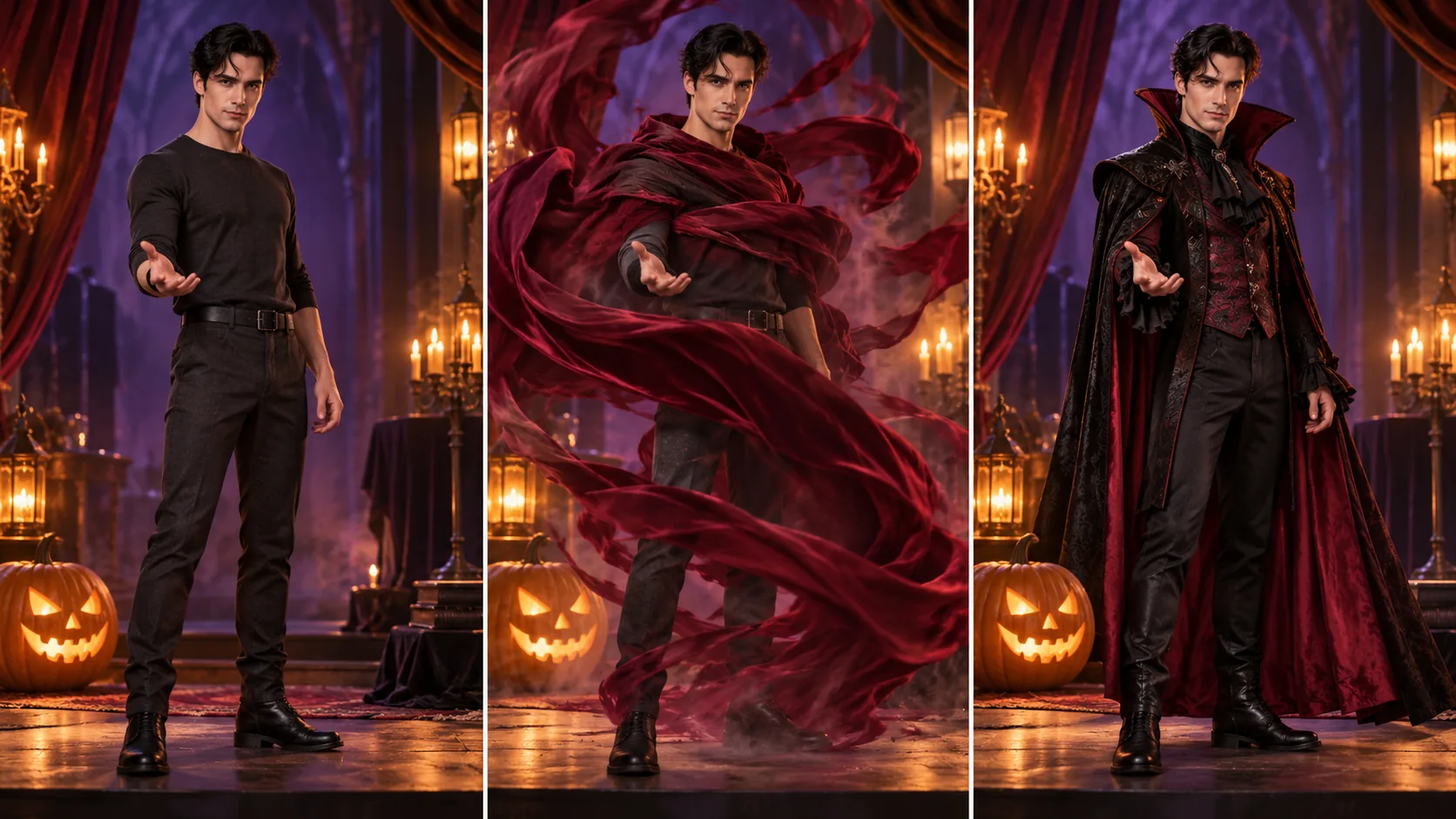
Concept illustration generated with Codex imagegen; not a screenshot or Seedance output.
What the Halloween example actually shows
On October 16, 2026, ModengSir described a Halloween cosplay sequence made using Seedance 2.0 through HitPaw VikPea. The creator first prepared the protagonist's image, iterated a draft prompt with ChatGPT, revised the wording with DeepSeek, and translated it into English before generation. This is their reported tool sequence; it does not establish that two writing assistants or English translation are necessary.
Their published prompt sequence divides the idea into opening, transition, costume reveal, and return beats. It repeatedly describes the same character while changing costume, lighting, and surroundings. Eye close-ups provide a recurring passage between looks. The useful lesson is the structure, rather than copying every effect into one request.
The source names Seedance 2.0, not 2.5. Separately, the official Seedance 2.5 page describes audiovisual generation and reference interpretation. That makes related experiments reasonable, but does not verify this particular transformation on 2.5. Check which model, input modes, and settings your chosen service actually exposes.
Start with one identity and one costume change
For a first attempt, choose an original adult character and two clearly different outfits. Keep the hairstyle, face, stance, camera height, and stage layout consistent. A plain outfit changing into a high-collared vampire costume is easier to evaluate than several characters changing clothes while the camera flies through different worlds.
Prepare a clear character reference. If your service accepts multiple images, identify each image's responsibility explicitly: identity, starting outfit, or intended final look. If it only accepts a starting image, do not assume additional pictures can be supplied through prompt text. Use the actual controls and reference labels shown by that provider.
Choose the delivery orientation in the settings. Describing a vertical composition helps communicate framing, but typing resolution numbers into a prompt does not set the export dimensions. Leave enough space for the costume silhouette and hands before adding camera movement.
Plan the reveal as three readable beats
Write a small shot plan before generating:
| Beat | What the viewer needs to see | Review question |
|---|---|---|
| Establish | Recognizable face and starting outfit | Is the identity clear before anything changes? |
| Cover | A cloak or cloth briefly crosses the body | Does the movement conceal the intended change? |
| Reveal | The new outfit settles into a readable pose | Is this still the same character in the same space? |
A cloth sweep is an alternative to the creator's eye-tunnel motif. It offers a simple visual reason for hiding the costume change. This is an editorial suggestion, not evidence that cloth transitions generate more reliably.
Keep the background and lighting stable initially. Once the first change is readable, you can experiment with a different setting or another costume. Changing identity, environment, camera direction, and lighting simultaneously makes failures harder to diagnose.
An original prompt to adapt
Use the provider's real reference syntax in place of the labels below. Set a supported duration and aspect ratio in its interface. The prompt describes the desired shot, not additional capabilities that every service must support.
Use the character reference for the same adult performer's face, short dark hair, and proportions throughout. A fixed medium-wide camera shows the performer on a small Halloween stage beside one carved pumpkin. Begin in a plain charcoal outfit. The performer lifts a burgundy cloth and sweeps it across the torso, briefly covering the costume. As the cloth lowers, reveal an elegant black-and-burgundy vampire outfit with a high collar. Keep the face, hairstyle, body position, pumpkin, and stage layout consistent. Hold the final pose long enough to read the costume. Warm amber lighting, restrained theatrical atmosphere. One performer, no additional characters, no captions.If identity changes, simplify the action and examine the reference before adding stronger adjectives. If the outfit never changes, clarify which appearance belongs before and after the cloth sweep. If the model creates a cut where you wanted a continuous movement, decide whether that cut is acceptable for the final edit or whether the shot needs another attempt.
Match the beat during editing
A prompt can ask for a dramatic beat, but the published wording alone does not prove frame-accurate synchronization. Select the useful reveal frame in the generated clip, then align it with the chosen musical accent in your editor. Trim the setup or adjust the cut around the transition as needed.
For several costumes, use a shot list and assemble selected clips rather than assuming the entire sequence must come from one generation. Check face continuity at every join. Read the character and storyboard guide for separating identity references from shot order, and the music reference explanation before assuming a reference track will survive unchanged.
Before export, review the face during the cover movement, hands around the cloth, costume edges, background objects, and final pose. Watch once without sound to judge visual continuity, then with sound to check the reveal. Keep a record of the reference, prompt, model, settings, and selected take. Your next useful step is one readable transformation that you can inspect and edit; add more costumes after that foundation works.